


Gettysburg Battle Auto Tour
4.798.00 Reviews
App Specs
- Version
- 9.29
- Updated On
- License
- Free
- Downloads
- 10,000+
- Developer
- Action Tour Guide LLC
- Categories
- Travel & Local
- Platform
- Android
Screenshots
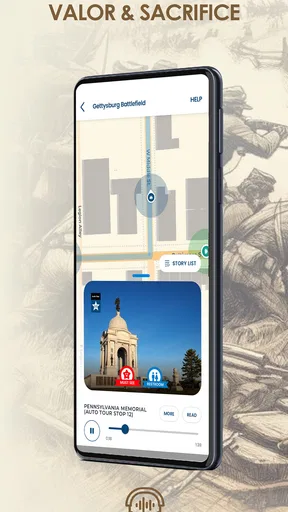
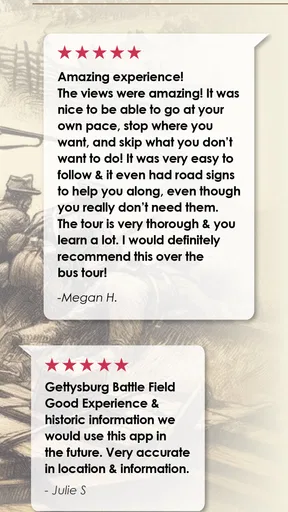
 Analysis by AppCompare
Ever thought about reliving one of the most pivotal moments in American history? Well, buckle up, because the Gettysburg Battle Auto Tour app is here to give you a front-row seat to history. I recently took this app for a spin—literally—and I'm here to give you the lowdown.
Finding your way through a self-guided visit
Before setting off, I would treat the tour as a driving companion rather than a replacement for planning the day. Gettysburg’s battlefield is a place where you may want to pause, walk, read signs, or spend longer at one spot than another. A GPS-guided route can help connect the drive with the places around you, while your own itinerary still decides how much time each stop gets. That distinction matters if you are visiting with someone who prefers a relaxed pace or has limited energy for a long day outdoors.
For a smoother start, I’d check the route and get the app ready while parked, then put the phone somewhere it can be heard without needing to be handled. That small bit of preparation is useful for any location-based tour: it reduces last-minute screen attention and lets the driver concentrate on the road. If you are travelling with a passenger, they can take responsibility for any screen checks or choices, leaving the driver to listen.
Reading, listening, and sharing the experience
The tour’s audio-led format is a practical choice for a battlefield drive because it allows visitors to take in historical context without constantly reading a screen. That can work well for people who find small text tiring, though it is not the same as having every detail available in a format that suits every visitor. I would use the audio as the main thread and treat any visual material as something to inspect only when safely parked.
It also makes the experience easier to share. One person can follow the route while others listen, which is more sociable than passing a phone around at every stop. Families can use the pauses between stories to talk about what they have just heard, rather than trying to absorb everything at once. With children, I’d keep the visit flexible: a shorter drive with a few meaningful stops may be more successful than trying to cover every part of the battlefield in one go.
Who benefits most from the format
I can see this being especially useful for visitors who want historical context but do not want to join a scheduled group. It suits a couple travelling at their own pace, a family fitting a visit around other plans, or a solo visitor who is comfortable navigating a driving route. It can also help people who prefer listening to a guide rather than reading lengthy panels at each location.
There are situations where I would choose something else. If you want a live guide who can respond to questions, adapt the explanation to your interests, or help with on-the-spot interpretation, a person-led tour is a better fit. If you plan to explore mainly on foot, a map-based or walking-focused resource may serve you better than an experience built around driving. And if you are the driver, this should never become a reason to look down at the phone while moving; the route and audio should support attentive driving, not compete with it.
Worth Reading Before You Choose

EA SPORTS FC Mobile 26 Is a Bigger Football Game, but It Takes Time

Flipboard Shows What News Apps Must Do Beyond the Feed

Switching to Android Auto Means Rethinking Your Driving Routine

Google Calendar Makes a Crowded Week Easier to Manage

Ludo King Makes the Most of the Minutes Between Plans

Baby Panda World Brings Quick Play to Modern Phones, but Its Game Library Feels Busy
Setting the Scene
So, what's this app all about? Imagine cruising through the historic town of Gettysburg with a personal tour guide riding shotgun. The Gettysburg Battle Auto Tour app is designed to offer an immersive experience as you drive through the iconic battlefield. It's like having a historian whispering tales of courage, strategy, and sacrifice into your ear, all while you sit comfortably in your car.
Diving into the Features
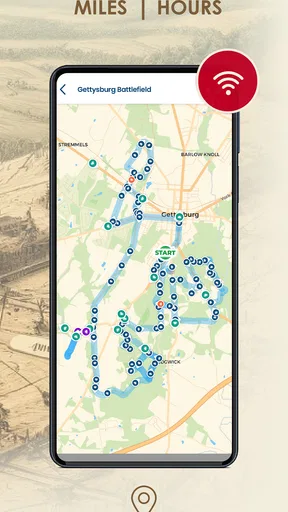
First off, the app is super user-friendly. Once you download it, you're greeted with a sleek interface that's easy to navigate. The tour is GPS-enabled, which means it triggers audio commentary automatically as you approach various landmarks. No fiddling with your phone while driving—just focus on the road and the stories unfolding around you.
The audio commentary is top-notch. It features professional narrators who bring the historical events to life with vivid descriptions and fascinating anecdotes. You'll hear about key figures, battle strategies, and personal stories that add depth to the experience. Trust me, it's easy to get lost in the narrative.
An Educational Journey
One of the coolest things is how educational the tour is. Whether you're a history buff or just curious, the app provides insights that are both informative and engaging. It covers everything from the strategic importance of the battlefield to the human stories behind the conflict. And let’s not forget the stunning visuals—each stop on the tour is accompanied by historical photos and maps that help you visualize the events.
If you're traveling with kids, this is a fantastic way to introduce them to American history. The stories are told in a way that's accessible without dumbing down the content. It’s like having a history class on wheels, but way more fun.
Planning around real-world conditions
In practice, I’d build in time for more than just the narrated route. A visitor may need restroom breaks, a meal, a quiet pause, or extra time to move between the car and a place to stand. The freedom to take breaks is valuable, but it also means you are managing the day yourself. I’d decide in advance what matters most—hearing the main story, seeing particular locations, or keeping the visit comfortable for everyone—rather than treating completion as the goal.
For visitors with sensory preferences, audio can be easier than a crowded group setting, but it is still worth thinking about volume and listening comfort. A passenger can adjust the experience while parked, and headphones should not interfere with the driver’s awareness of traffic or other important sounds. If someone in the car does not want continuous narration, you can use natural pauses to talk, rest, or simply take in the surroundings. The best pace is the one that lets everyone stay engaged without feeling rushed.
Costs, compatibility, and choosing an alternative
The app is free to install, while in-app purchases range from $2.99 to $99.99 per item. I would check what the purchase options cover before relying on the app for a full visit, and make that decision while parked rather than when you are already following the route. The listed age rating is Everyone, which makes it suitable for a broad audience, though parents will still know best whether the subject matter and length suit their children.
Action Tour Guide LLC develops the app, which belongs to the travel and local category. It has a 4.7 average from around 382 ratings, with 97 written reviews, and has passed 10,000 installs. It was released on April 7, 2020; version 9.29 requires iOS 9 or later. Those figures offer a little context about its presence, but they do not tell you whether the guided driving format matches your own needs. I’d make that choice based on how you want to experience the battlefield.
Compared with a general navigation app, this is aimed at adding historical narration rather than simply getting you from one place to another. Compared with a live tour, it trades personal interaction for control over your timing. That trade-off is the point: visitors who like independent exploration may appreciate the freedom, while someone who wants questions answered in the moment may find a human guide more rewarding. A printed guide or on-site signs can also be a sensible fallback if you prefer to read at your own pace or do not want to depend on a phone during the visit.
Making the day work for different visitors
For a realistic family visit, I would start by deciding who is driving and who will manage the app, then agree on a few priorities rather than promising to see everything. If a child gets restless, the family can pause the narration and take a break. If an older visitor needs a slower pace, the group can spend longer at a convenient stop instead of feeling pulled along by a fixed tour schedule. This flexibility is useful, but it does not remove the need to consider walking distances, weather, seating, or other practical needs at the places you choose to visit.
For someone visiting alone, the hands-free audio approach can make the drive feel more informative, but I would still prepare before moving and avoid changing settings while driving. A passenger-led setup is safer and more comfortable when available. These small choices make a difference: the app is most helpful when it fits into a visit plan, not when it is expected to manage every detail of the day.
What to expect from the experience
One useful way to approach a GPS-triggered tour is to give each story room to finish before changing plans. If you stop unexpectedly or take a detour, you may need to reorient yourself and decide how to continue. I would keep a simple backup plan—such as knowing the next place you intend to visit—so a pause does not turn into frustration. This is a general trade-off of location-led experiences: they can make a route feel coherent, but the visitor remains responsible for adapting when real life interrupts.
The app is less compelling if you want an entirely screen-free day, if you prefer a guide who can tailor every explanation, or if driving is not how you intend to see Gettysburg. It may also be a poor match when the group has conflicting interests and no one wants to share one audio experience. In those cases, separate reading, a walking visit, or a guided experience may better suit the group. I would not call those shortcomings unique to this app; they are limits of choosing a self-guided car tour in the first place.
Why It Stands Out
What sets this app apart from other tour guides is its ability to make you feel like a part of the story. The combination of audio, visuals, and location-based triggering creates an immersive experience that's hard to match. Plus, the convenience factor is huge—you can explore at your own pace without being tied to a tour group schedule.
Another thing I appreciated was the flexibility. You can start and stop the tour as you please, which is perfect if you want to take breaks or explore specific areas in more detail. The app gives you the freedom to customize your journey.
Final Thoughts
All in all, the Gettysburg Battle Auto Tour app is a must-have for anyone visiting the area. It's like having a personal historian and tour guide wrapped up in one handy app. Whether you're a history enthusiast, a curious traveler, or someone looking for an educational family trip, this app ticks all the right boxes.
So, next time you find yourself in Gettysburg, give this app a whirl. It's a journey through history that you won't soon forget. And hey, who doesn't love a good road trip with a side of adventure and learning?
My recommendation is strongest for visitors who want an independent, audio-guided drive and are happy to let the route provide structure while keeping control of their stops. For the most comfortable experience, prepare the phone before setting out, share app handling with a passenger when possible, and leave enough time to pause without pressure. If your priority is individual assistance, a walking-focused day, or a guide who can respond to questions, choose a different format. For everyone else, this offers a straightforward way to give a Gettysburg drive more historical context while letting the group decide its own pace.
Pros
- Detailed historical insights and facts.
- Easy navigation with GPS integration.
- Offline access for remote areas.
- Engaging audio narration enhances experience.
- Customizable tour for flexible exploration.
Cons
- Limited free content available.
- Requires strong GPS signal for accuracy.
- Some areas lack detailed coverage.
- App can drain battery quickly.
- No support for non-English languages.
FAQs for Gettysburg Battle Auto Tour
What is the Gettysburg Battle Auto Tour app?
The Gettysburg Battle Auto Tour app is an immersive guide designed to enhance your visit to the Gettysburg Battlefield. It provides a self-guided audio tour with detailed information about key historical sites, events, and figures from the Battle of Gettysburg. The app uses GPS to offer location-based content, ensuring you have contextually relevant insights during your tour.
How does the GPS functionality work in the app?
The app's GPS functionality automatically triggers audio narration when you approach significant sites on the battlefield. This ensures you receive relevant historical information at the right moment. Make sure your device's location services are enabled for the app, and keep an eye on battery usage as GPS can be power-intensive.
Is an internet connection required to use the app?
No, an internet connection is not required while using the tour. Once the app and its content are fully downloaded, you can enjoy the tour offline. This is particularly useful given the sometimes spotty mobile network service around the battlefield. Ensure you download all necessary files before starting your tour.
Can I customize my tour experience?
Yes, the app allows for a personalized tour experience. You can select specific points of interest or follow the default route. There’s flexibility to skip sections or repeat parts of the tour as desired. This customization ensures that whether you have an hour or a full day, you can tailor the experience to your schedule.
What devices are compatible with the Gettysburg Battle Auto Tour app?
The Gettysburg Battle Auto Tour app is available for both Android and iOS devices. It supports most smartphones and tablets running on recent operating systems. Check the app store for specific compatibility details to ensure your device can run the app smoothly before downloading.


